Windows OS
Windows OS (often referred to as WinOS) is a graphical operating system developed by Microsoft that enables users to interact with computers through a GUI instead of command-line interfaces. It manages hardware resources, runs applications, and provides tools for file management, networking, and security.
In this section, you'll find my PowerShell scripts written for Windows OS
Windows OS computers waiting for reboot after windows monthly patching
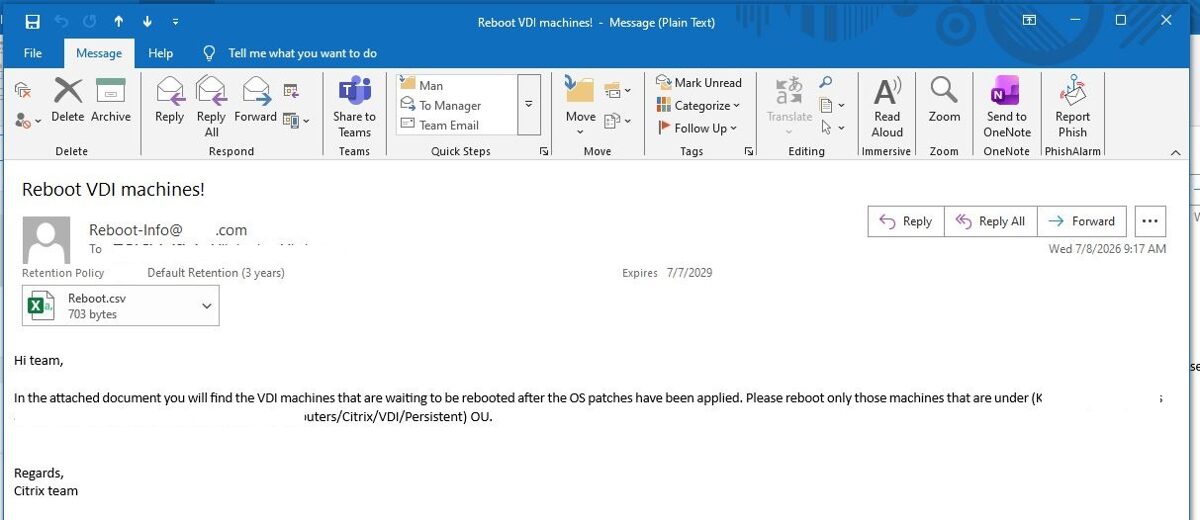
After Windows updates are installed on Windows computers, the Windows OS usually prompts you to restart the computer. However, for a variety of reasons, you might not see this prompt and may not realize that the computer is waiting to be restarted. To avoid such issues, I wrote a PowerShell script that scans computers on the network and checks whether a computer is waiting to be restarted after a Windows update has been installed. The information is collected in a CSV file and sent to Citrix support agents.
Here are the key benefits:
1. Improves Patch Compliance
· Identifies systems where updates have been installed but are not yet fully applied because a reboot is pending.
2. Enhances Security
· Ensures security patches become effective as soon as possible by highlighting systems awaiting a restart.
3. Reduces Security Risk
· Minimizes the window during which systems remain vulnerable despite having updates installed.
4. Provides Environment Visibility
· Gives administrators a clear view of all devices with pending reboot requirements.
5. Automates Health Checks
· Eliminates the need to manually inspect each server or workstation.
6. Saves Administrative Time
· Reduces repetitive manual effort, especially in large environments with hundreds or thousands of devices.
7. Supports Large-Scale Operations
· Makes it practical to monitor reboot status across enterprise environments.
8. Improves Patch Management
· Helps verify that monthly patch deployment has progressed to completion.
9. Reduces Configuration Drift
· Ensures systems remain in a consistent, fully updated state.
10 Facilitates Maintenance Planning
· Identifies devices that require scheduled restarts during maintenance windows.
11. Improves System Stability
· Pending reboots often leave updates incomplete; completing the restart can prevent issues caused by partially applied updates.
13. Supports Compliance Requirements
· Helps organizations demonstrate that updates have been fully implemented, supporting internal policies and regulatory requirements.
14. Enables Proactive Remediation
· Allows IT teams to contact users or schedule reboots before pending restarts become operational issues.
15. Provides Actionable Reporting
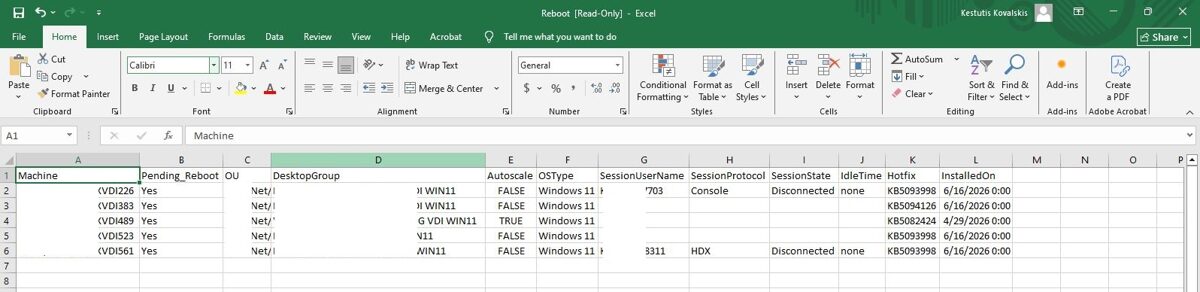
Can generate reports showing:
· Computers awaiting reboot
· Pending reboot status
· The Active Directory organizational unit (OU) that contains the computer
· Citrix Desktop Group name
· Desktop Groups Autoscale status
· Machine’s OS Type
· Citrix user name if user is connected into the machine via Citrix
· Session protocol
· Session State
· Session Idle Time
· Last hotfix installed
· update installation date
16. Reduces Help Desk Incidents
· Resolving pending reboots proactively can prevent update-related support tickets and user issues.
17. Supports Automation Workflows
Can be integrated with:
· Task Scheduler
· Email notifications
18. Prioritizes Critical Systems
· Enables administrators to quickly identify production servers or business-critical endpoints that require attention.
19. Improves Operational Efficiency
· Allows administrators to focus on systems that need intervention instead of reviewing every device.
20. Provides Historical Tracking
· Maintains logs and trends showing reboot compliance over time, helping identify recurring issues or departments with delayed restarts.
21. Supports Better Decision-Making
· Supplies accurate, up-to-date data for IT dashboards, maintenance planning, and management reporting.
· Resolving pending reboots proactively can prevent update-related support tickets and user issues.
17. Supports Automation Workflows
Can be integrated with:
· Task Scheduler
· Email notifications
18. Prioritizes Critical Systems
· Enables administrators to quickly identify production servers or business-critical endpoints that require attention.
19. Improves Operational Efficiency
· Allows administrators to focus on systems that need intervention instead of reviewing every device.
20. Provides Historical Tracking
· Maintains logs and trends showing reboot compliance over time, helping identify recurring issues or departments with delayed restarts.
21. Supports Better Decision-Making
· Supplies accurate, up-to-date data for IT dashboards, maintenance planning, and management reporting.
Sample email sent to agents:
Log file.
Log file.
Attached to the Email log file example:
Overall Value
This PowerShell script provides proactive monitoring of Windows computers by identifying systems that are waiting for a restart after Windows updates have been installed. It improves patch compliance, enhances security and system stability, reduces manual administrative effort, and enables timely maintenance planning. By automatically generating a CSV report and notifying the Citrix support team, the script helps ensure that Windows updates are fully applied and reduces the operational risks associated with delayed system restarts.Find stuck machine
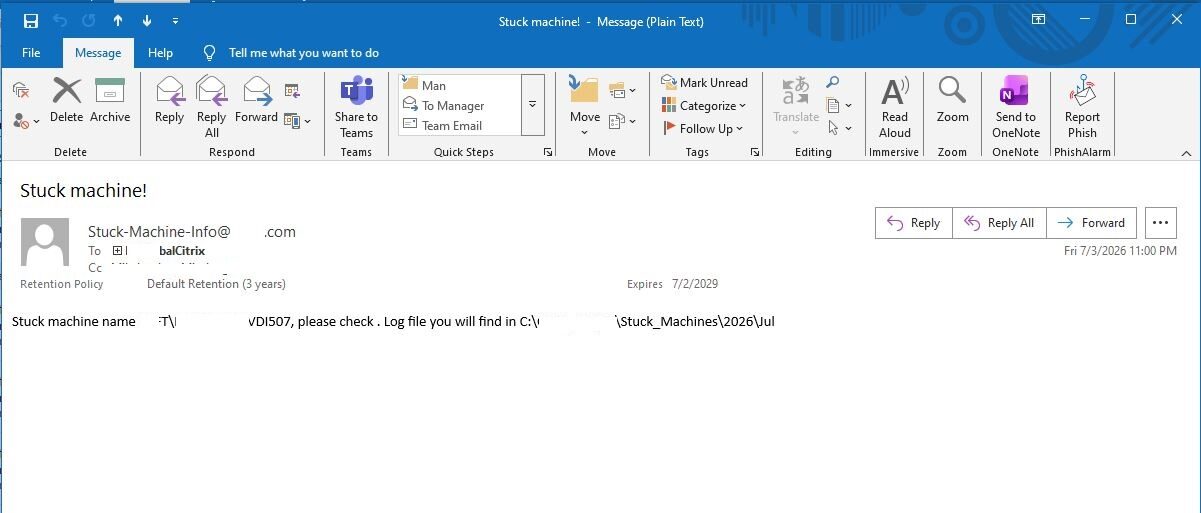
There are situations where a Windows OS computer freezes, and Citrix DaaS doesn’t always detect it. As a result, you might not even notice that the computer has frozen until users start complaining that they can’t log in to it. To avoid such situations, I wrote a PowerShell script that allows you to find unresponsive computers. However, it doesn’t rely solely on the ping command. The PowerShell script scans for powered-on computers using the quser command and waits one minute to see if the computer responds. If the computer responds, the script moves on to the next computer. If the computer does not respond, the script treats it as frozen. The computer's information is then logged in a log file, and Citrix support agents are notified via email about the frozen computer.
Benefits of the Frozen VDI Detection Script
1. Detects Frozen Computers That Standard Monitoring May Miss
· Identifies Windows computers that are powered on but no longer responding.
· Detects issues that may not immediately change the machine's status in Citrix DaaS.
· Complements existing Citrix health monitoring.
2. Reduces Service Disruptions
· Enables support teams to identify frozen VDIs before they generate multiple user incidents.
· Helps maintain a healthy pool of available desktops.
· Reduces the impact of unresponsive machines on end users.
3. Improves User Experience
· Prevents users from repeatedly attempting to connect to an unusable desktop.
· Reduces login failures caused by frozen machines.
· Increases confidence in the reliability of the Citrix environment.
4. Proactive Incident Detection
· Automatically scans for unresponsive computers on a scheduled basis.
· Eliminates the need to wait for user complaints before investigating.
· Enables earlier intervention and faster remediation.
5. More Accurate Than Simple Ping Monitoring
· Does not rely solely on ICMP (ping), which only confirms basic network connectivity.
· Uses the quser command to verify that the operating system is actually responding.
· Distinguishes between a reachable computer and a responsive Windows session.
6. Reduces False Positives
· Waits one minute before classifying a computer as frozen.
· Avoids reporting temporary delays caused by high CPU utilization, startup, or short-lived performance issues.
· Improves the reliability of alerts.
7. Accelerates Incident Response
· Automatically notifies Citrix support agents by email.
· Reduces the time between a computer freezing and the start of troubleshooting.
· Helps lower Mean Time to Detect (MTTD) and Mean Time to Resolve (MTTR).
8. Provides Historical Records
· Logs detected frozen computers to a log file.
· Creates an audit trail for troubleshooting and trend analysis.
· Helps identify recurring issues affecting specific machines.
9. Reduces Manual Health Checks
· Eliminates the need for administrators to manually test desktop responsiveness.
· Automates repetitive monitoring tasks.
· Allows support teams to focus on higher-priority activities.
10. Improves Infrastructure Availability
· Helps ensure that only healthy desktops remain available for user connections.
· Supports higher desktop availability by enabling faster remediation of frozen machines.
· Contributes to a more stable Citrix environment.
11. Supports Root Cause Analysis
· Historical log data can reveal patterns, such as:
· Frequently freezing machines.
· Issues occurring after updates or configuration changes.
· Hardware or software problems affecting specific desktops.
· Provides valuable information for long-term reliability improvements.
12. Easily Extensible
The script can be enhanced with features such as:
· Automatic restart or reboot of confirmed frozen machines.
· Configurable response time thresholds before a machine is classified as frozen.
· Dashboards and reports showing freeze frequency and trends.
· Escalation notifications if a machine remains unresponsive for an extended period.
Email sent:
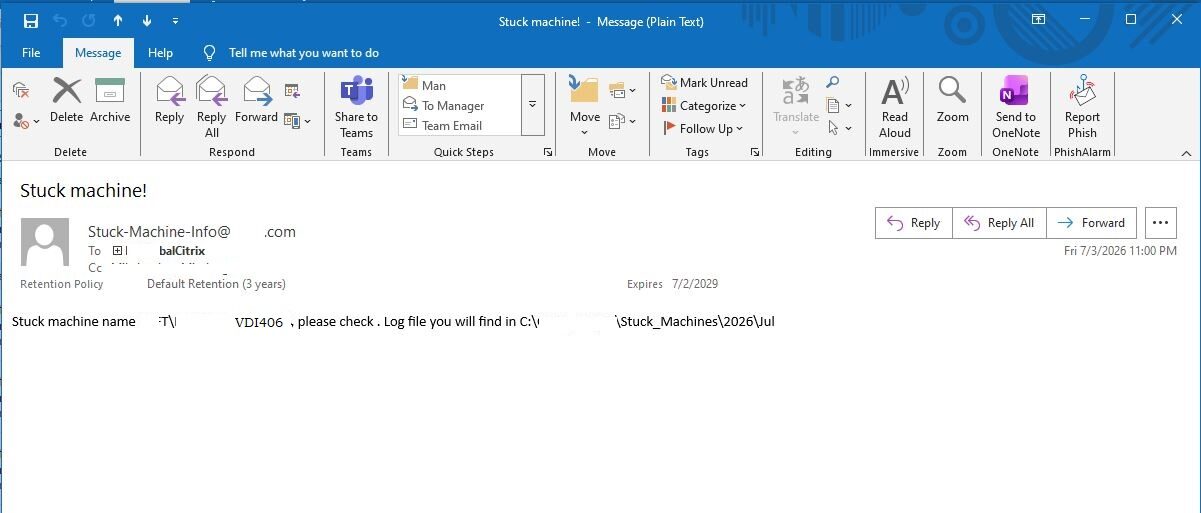
Another email example:
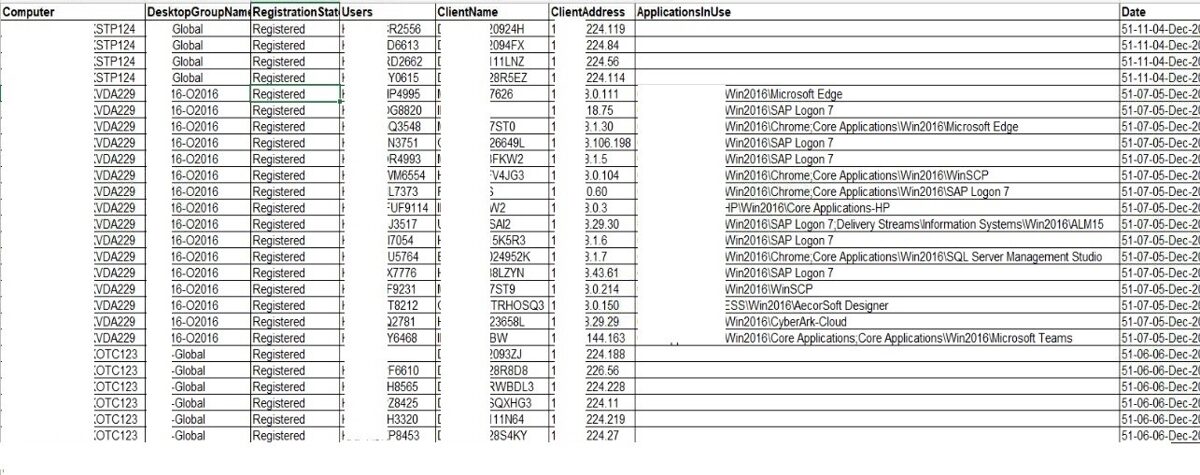
Log file also is generated.
Log file consists of the following details:
· Computer name
· Citrix Desktop Group name
· Computer Registration State in Citrix
· Connected User Id
· Connected user Computer name
· Connected user computer IP address
· Applications in use (the name of the application that the user launched as a published Citrix application)
· Date when log file was generated
Overall Value
This script provides an additional layer of health monitoring by identifying powered-on Windows VDIs that have become unresponsive, even when they continue to appear available in Citrix DaaS. By validating responsiveness with the quser command instead of relying solely on network connectivity, it delivers more meaningful health checks, reduces false positives, enables faster incident response, and helps maintain a reliable, high-availability Citrix environment.
Benefits of the Frozen VDI Detection Script
1. Detects Frozen Computers That Standard Monitoring May Miss
· Identifies Windows computers that are powered on but no longer responding.
· Detects issues that may not immediately change the machine's status in Citrix DaaS.
· Complements existing Citrix health monitoring.
2. Reduces Service Disruptions
· Enables support teams to identify frozen VDIs before they generate multiple user incidents.
· Helps maintain a healthy pool of available desktops.
· Reduces the impact of unresponsive machines on end users.
3. Improves User Experience
· Prevents users from repeatedly attempting to connect to an unusable desktop.
· Reduces login failures caused by frozen machines.
· Increases confidence in the reliability of the Citrix environment.
4. Proactive Incident Detection
· Automatically scans for unresponsive computers on a scheduled basis.
· Eliminates the need to wait for user complaints before investigating.
· Enables earlier intervention and faster remediation.
5. More Accurate Than Simple Ping Monitoring
· Does not rely solely on ICMP (ping), which only confirms basic network connectivity.
· Uses the quser command to verify that the operating system is actually responding.
· Distinguishes between a reachable computer and a responsive Windows session.
6. Reduces False Positives
· Waits one minute before classifying a computer as frozen.
· Avoids reporting temporary delays caused by high CPU utilization, startup, or short-lived performance issues.
· Improves the reliability of alerts.
7. Accelerates Incident Response
· Automatically notifies Citrix support agents by email.
· Reduces the time between a computer freezing and the start of troubleshooting.
· Helps lower Mean Time to Detect (MTTD) and Mean Time to Resolve (MTTR).
8. Provides Historical Records
· Logs detected frozen computers to a log file.
· Creates an audit trail for troubleshooting and trend analysis.
· Helps identify recurring issues affecting specific machines.
9. Reduces Manual Health Checks
· Eliminates the need for administrators to manually test desktop responsiveness.
· Automates repetitive monitoring tasks.
· Allows support teams to focus on higher-priority activities.
10. Improves Infrastructure Availability
· Helps ensure that only healthy desktops remain available for user connections.
· Supports higher desktop availability by enabling faster remediation of frozen machines.
· Contributes to a more stable Citrix environment.
11. Supports Root Cause Analysis
· Historical log data can reveal patterns, such as:
· Frequently freezing machines.
· Issues occurring after updates or configuration changes.
· Hardware or software problems affecting specific desktops.
· Provides valuable information for long-term reliability improvements.
12. Easily Extensible
The script can be enhanced with features such as:
· Automatic restart or reboot of confirmed frozen machines.
· Configurable response time thresholds before a machine is classified as frozen.
· Dashboards and reports showing freeze frequency and trends.
· Escalation notifications if a machine remains unresponsive for an extended period.
Email sent:
Another email example:
Log file also is generated.
Log file consists of the following details:
· Computer name
· Citrix Desktop Group name
· Computer Registration State in Citrix
· Connected User Id
· Connected user Computer name
· Connected user computer IP address
· Applications in use (the name of the application that the user launched as a published Citrix application)
· Date when log file was generated
Overall Value
This script provides an additional layer of health monitoring by identifying powered-on Windows VDIs that have become unresponsive, even when they continue to appear available in Citrix DaaS. By validating responsiveness with the quser command instead of relying solely on network connectivity, it delivers more meaningful health checks, reduces false positives, enables faster incident response, and helps maintain a reliable, high-availability Citrix environment.