Windows Registry
On this page, you'll find Windows registry GUI programs built using PowerShell
Registry Checker
As you probably know, when working with computers, it is sometimes necessary to make changes to the Windows registry. This can be easily done using the regedit program. However, problems arise when you need to compare the registries of several computers and make changes on multiple computers. Doing this manually would take a lot of time and you’d most likely make mistakes.
To solve these problems, I created a program that I called "Registry Checker."
Benefits of a GUI Registry Management Application (Registry checker)
A GUI application with these registry management capabilities can provide substantial value for IT administrators, helpdesk teams, Citrix administrators, EUC teams, and system engineers.
A GUI application with these registry management capabilities can provide substantial value for IT administrators, helpdesk teams, Citrix administrators, EUC teams, and system engineers.
1. Faster Troubleshooting
· Quickly verify whether required registry keys and values exist.
· Identify configuration differences between working and non-working devices.
· Accelerate root cause analysis for application, Windows, Citrix, Teams, Zoom, Edge, and Outlook issues.
· Eliminate the need for manual navigation through Registry Editor.
2. Configuration Validation
· Verify that required registry settings have been correctly applied.
Confirm the success of:
· Group Policy deployments
· Intune policies
· SCCM/MECM deployments
· Login scripts
· Application installations
· Ensure standard configurations across devices.
3. Registry Compliance Auditing
· Check whether computers comply with corporate standards.
· Detect missing or unauthorized registry settings.
· Verify security-related registry configurations.
· Support internal and external audit activities.
4. Rapid Registry Search Capabilities
Finding registry information is often time-consuming using Regedit.
Benefits include:
· Search by registry key name.
· Search by registry value name.
· Search by registry value data.
· Locate settings even when the exact path is unknown.
· Reduce troubleshooting time from minutes to seconds.
5. Registry Anomaly Detection
The ability to find registry anomalies by computer and user provides significant operational value.
Benefits include:
· Identify missing registry keys.
· Detect unexpected registry values.
· Find deviations from baseline configurations.
· Compare user configurations across systems.
· Detect configuration drift before it causes incidents.
6. Simplified Change Management
Registry changes can be performed through a controlled GUI rather than manually through Regedit.
Benefits include:
· Create registry keys and values consistently.
· Modify existing values with reduced risk of mistakes.
· Delete obsolete or incorrect entries safely.
· Improve administrator productivity.
· Reduce human error.
7. Registry Backup and Recovery
Export and import functionality provides essential protection.
Benefits include:
· Backup registry settings before changes.
· Restore known-good configurations quickly.
· Roll back problematic modifications.
· Improve change-control processes.
· Reduce downtime after configuration mistakes.
8. Improved Security Administration
Registry settings often control security configurations.
Benefits include:
· Verify security hardening settings.
· Check application security configurations.
· Detect unauthorized modifications.
· Support vulnerability remediation projects.
· Validate security baselines.
9. Standardization Across Devices
Organizations often require identical configurations on many computers.
Benefits include:
· Export known-good registry settings.
· Import standardized settings to other systems.
· Maintain configuration consistency.
· Reduce configuration drift.
· Simplify environment management.
10. Enhanced Helpdesk Efficiency
Helpdesk teams can perform many registry-related tasks without requiring advanced registry expertise.
Benefits include:
· Faster incident resolution.
· Reduced escalations to higher support levels.
· Easier diagnosis of user-specific problems.
· Centralized visibility into registry configurations.
11. Improved Citrix and VDI Administration
Many Citrix, FSLogix, Teams VDI, Zoom VDI, and profile management settings are registry-based.
Benefits include:
· Verify VDI-specific settings.
· Compare configurations between VDI machines.
· Identify user-specific registry issues.
· Accelerate troubleshooting of session-related problems.
· Improve stability of virtual desktop environments.
12. Better Documentation and Reporting
Registry information can be collected and shared easily.
Benefits include:
· Document system configurations.
· Create support records.
· Provide evidence for change requests.
· Support audit and compliance reporting.
· Facilitate knowledge transfer between teams.
13. Reduced Human Error
Manual registry editing is prone to mistakes.
Benefits include:
· Prevent navigation errors.
· Reduce accidental deletion of keys.
· Simplify complex registry operations.
· Improve operational accuracy.
· Increase administrator confidence.
14. Time Savings
The combined capabilities significantly reduce administrative effort.
Benefits include:
· Faster searches.
· Faster validation of settings.
· Faster deployment of fixes.
· Reduced troubleshooting time.
· Increased overall IT productivity.
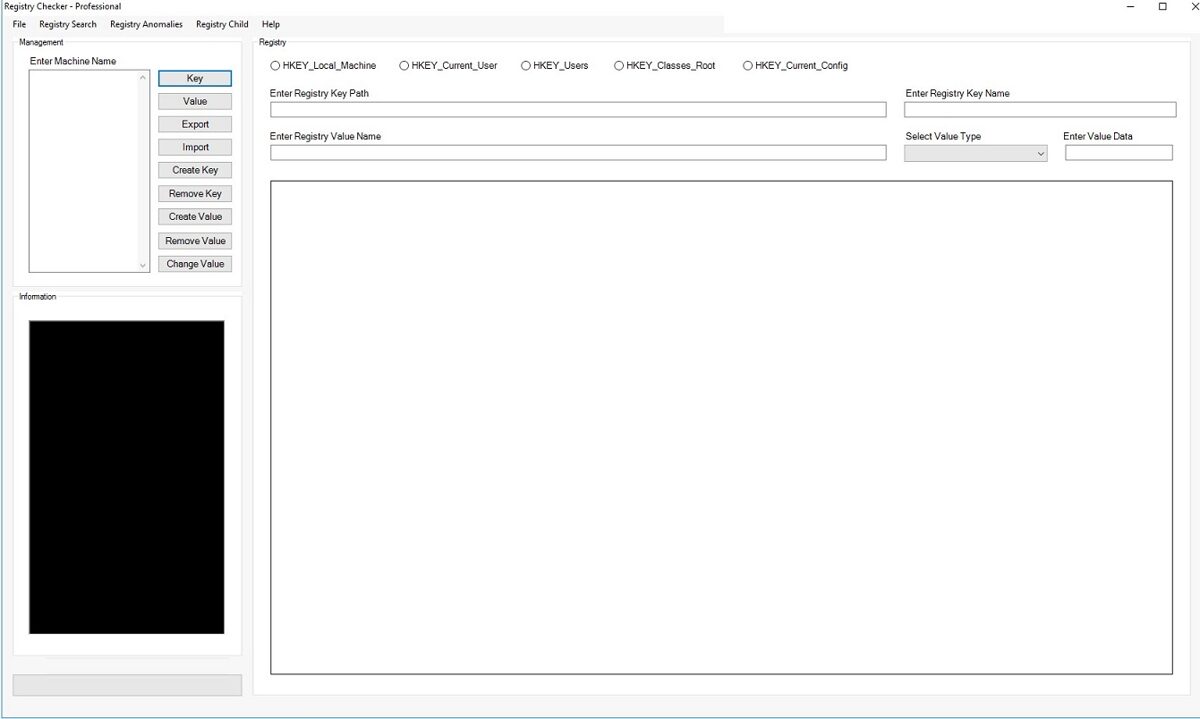
This application allows you to perform the following actions on multiple servers at once:
· Check registry keys
· Check registry values
· Export registries
· Import registries
· Create registry keys
· Delete registry keys
· Create registry values
· Delete registry values
· Change registry values
· Find registry keys by key name
· Find registry keys by value name
· Find registry keys by value data name
· Find registry anomalies by computer and user
· Display child values of registry keys
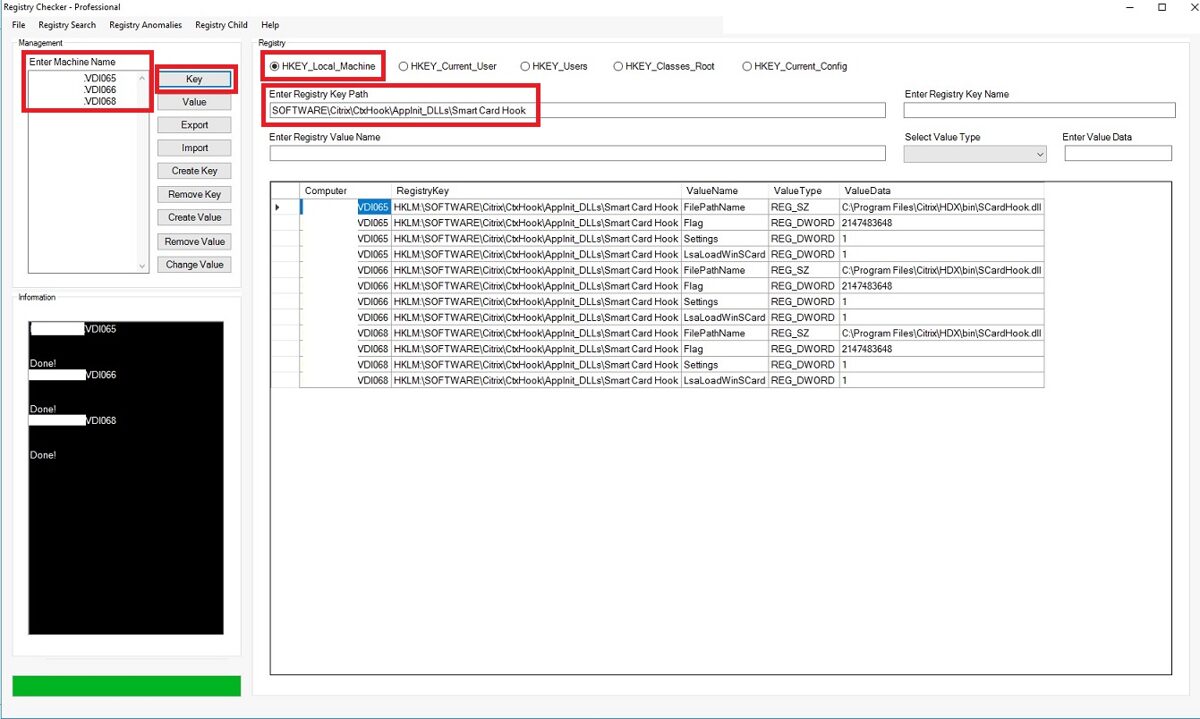
If you want to see only the registry keys, enter the computer names and the registry key paths.
Information can be retrieved from multiple computers at the same time.
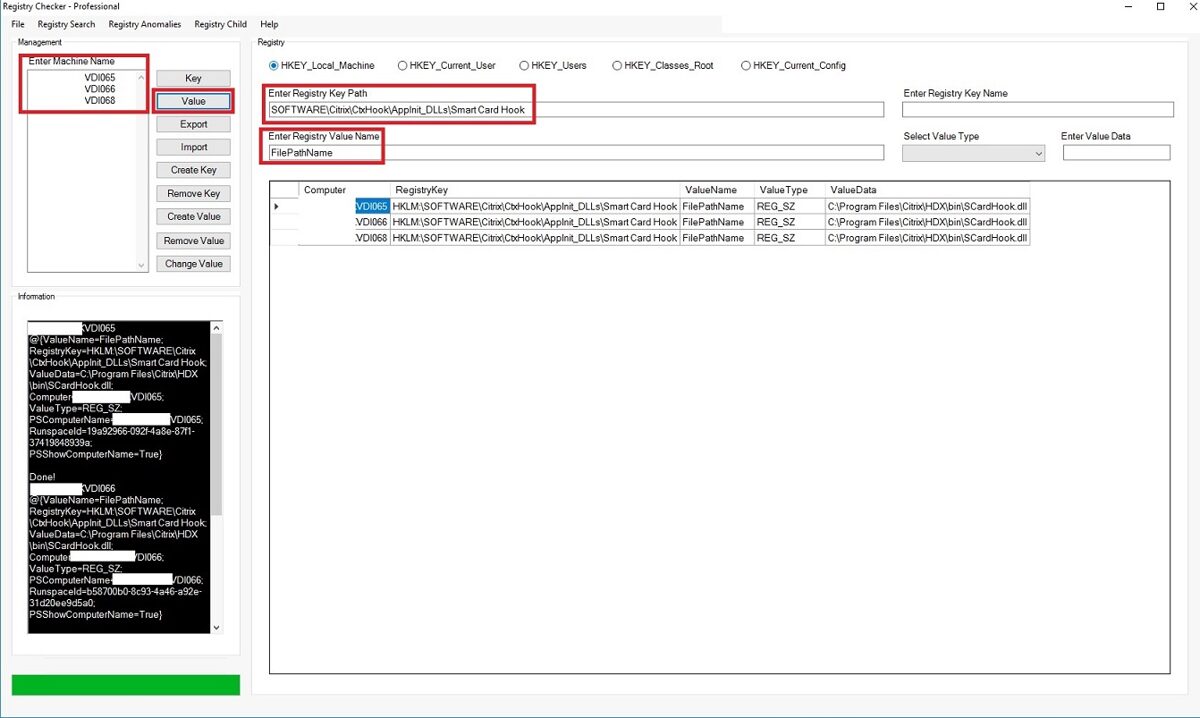
If you want to see only the values, enter the value name and click the "Value" button.
Information can be retrieved from multiple computers at the same time.
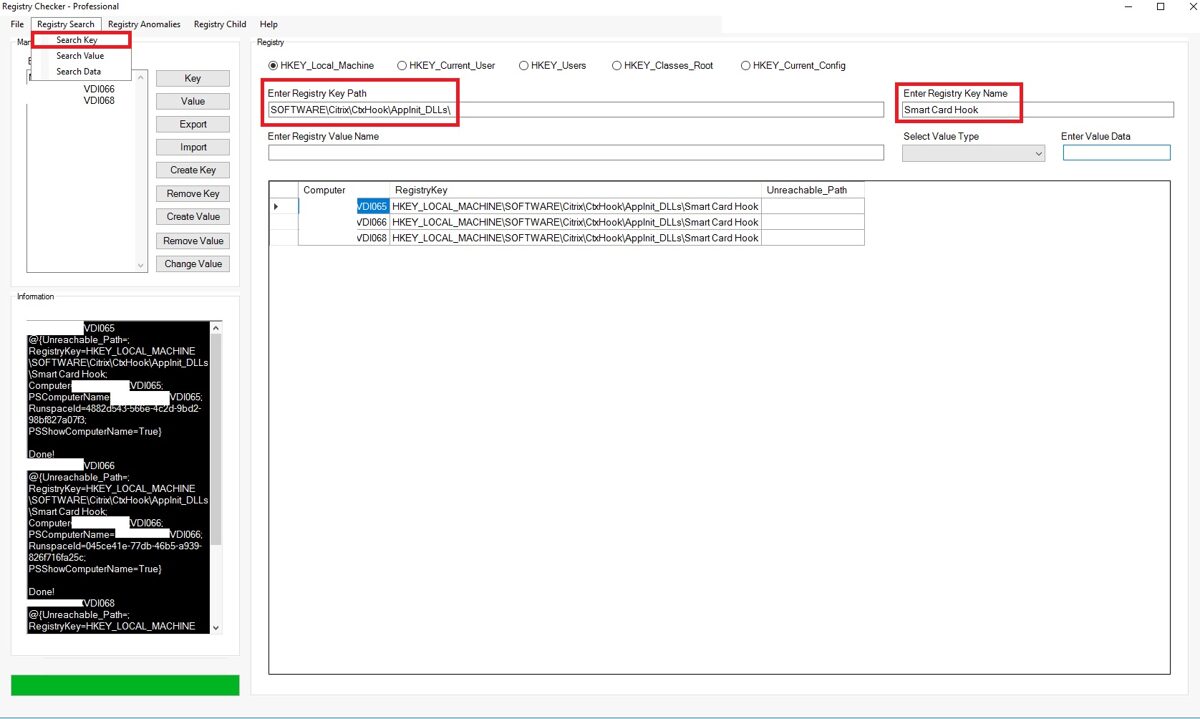
If you want to find a key by its name, enter the key name and click "Search KEY"
Information can be retrieved from multiple computers at the same time.
If you want to find a Value by its name, enter the key name and click "Search VALUE".
Information can be retrieved from multiple computers at the same time.
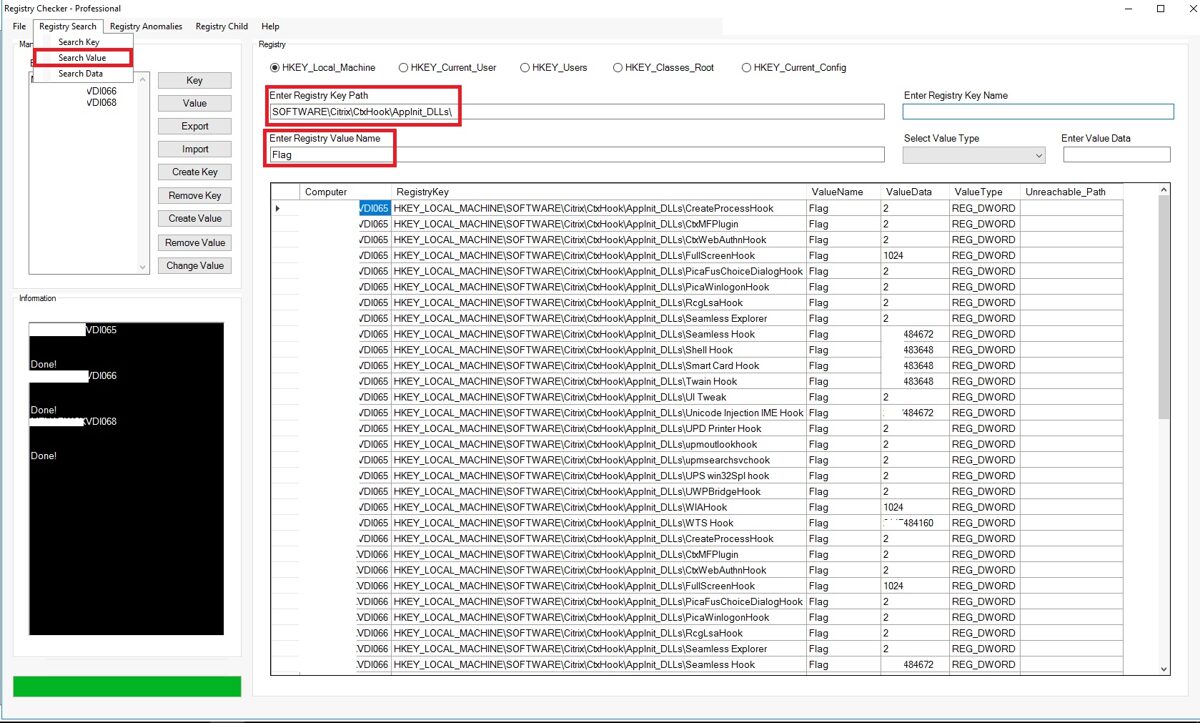
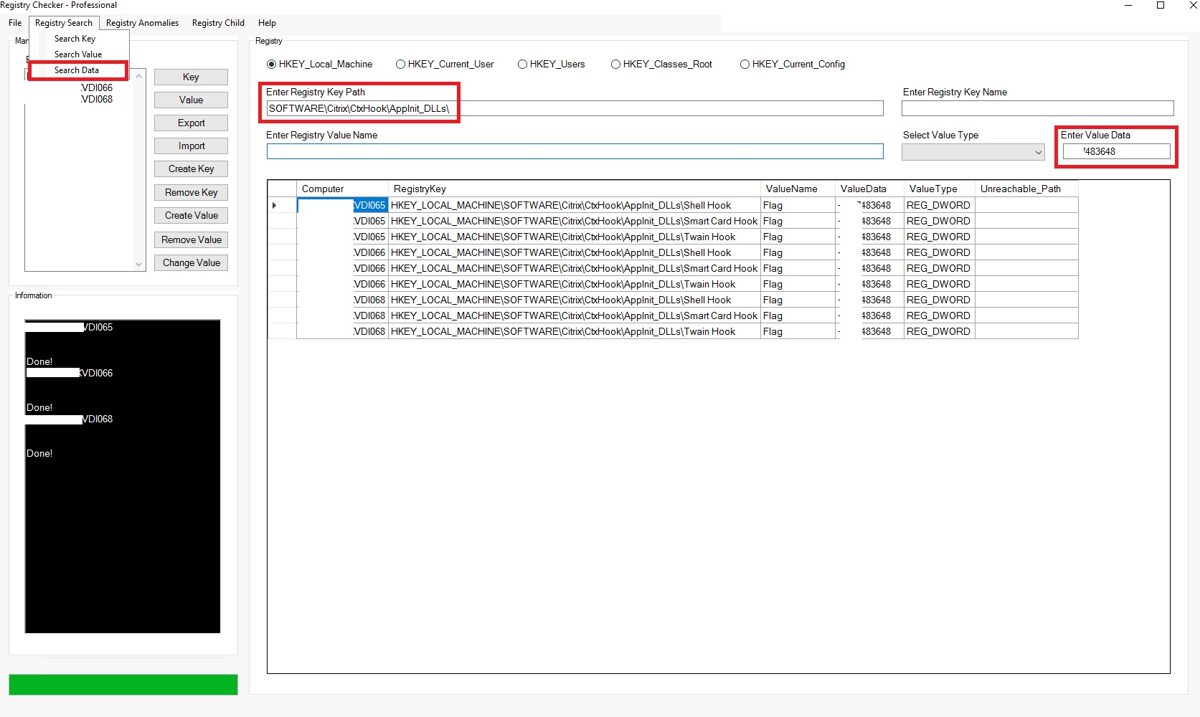
If you want to find a Data by its name, enter the key name and click "Search DATA".
Information can be retrieved from multiple computers at the same time.
Registry anomalies
In a Windows/enterprise context, registry anomalies refer to anything unusual, unexpected, or suspicious in the Windows Registry that deviates from a known-good baseline. These anomalies are often indicators of misconfiguration, software issues, persistence mechanisms, or even malware activity.
Below is a structured breakdown tailored to an admin/engineering perspective.
What counts as a registry anomaly
A registry anomaly is typically one of these:
Below is a structured breakdown tailored to an admin/engineering perspective.
A registry anomaly is typically one of these:
· Unexpected keys or values
· Unauthorized modifications to existing entries
· Missing keys
· that should exist
· Incorrect permissions (ACLs)
· Unusual data types or values
· Abnormal frequency of changes
· Unauthorized modifications to existing entries
· Missing keys
· that should exist
· Incorrect permissions (ACLs)
· Unusual data types or values
· Abnormal frequency of changes
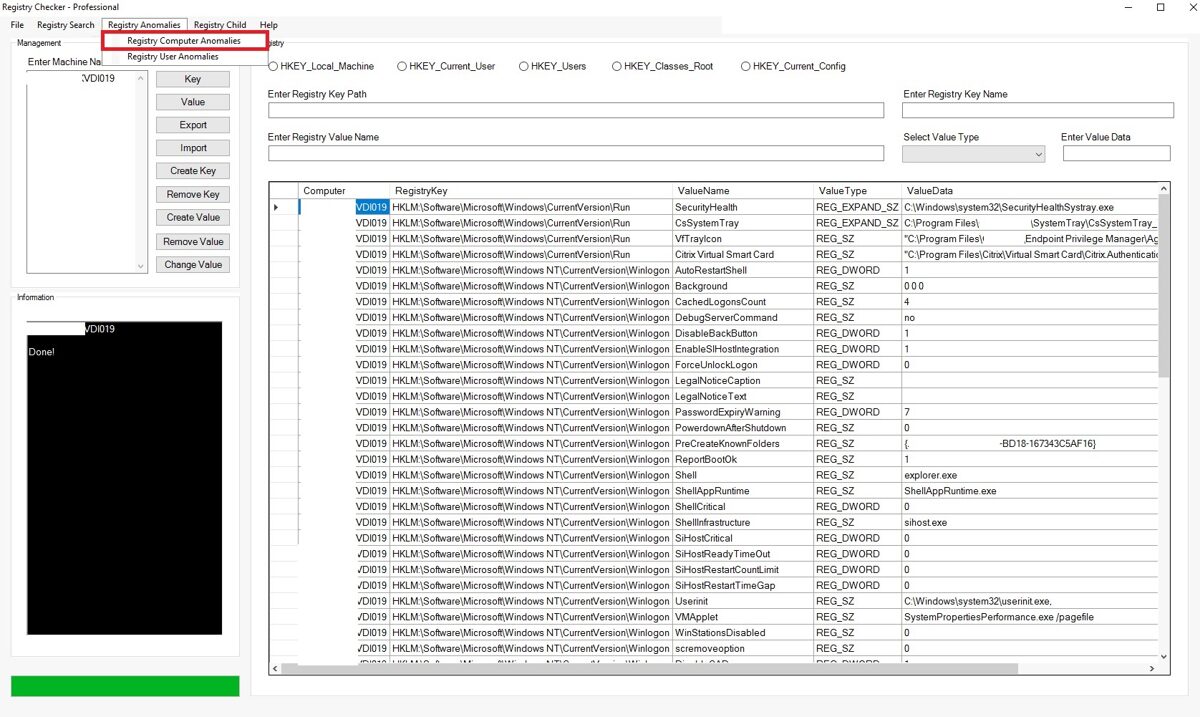
Registry anomalies consist of two parts (Computer Registry Anomalies and user Registry Anomalies) in application.
Computer Registry Anomalies
Below registry keys are checked by the program when you press on Computer Registry Anomalies button:
· 'HKLM:\Software\Microsoft\Windows\CurrentVersion\Run'
· 'HKLM:\Software\Microsoft\Windows\CurrentVersion\RunServices'
· 'HKLM:\SYSTEM\CurrentControlSet\Services'
· 'HKLM:\Software\Microsoft\Windows NT\CurrentVersion\Winlogon'
· 'HKLM:\Software\Microsoft\Windows NT\CurrentVersion\Image File Execution Options'
· 'HKLM:\Software\Microsoft\Windows NT\CurrentVersion\Windows'
· 'HKLM:\Software\Microsoft\Windows\CurrentVersion\Explorer\Browser Helper Objects'
· 'HKLM:\Software\Microsoft\Windows\CurrentVersion\Shell Extensions'
· 'HKLM:\Software\Microsoft\Windows\CurrentVersion\Explorer\StartupApproved'
· 'HKLM:\Software\Microsoft\Windows NT\CurrentVersion\Schedule'
· 'HKLM:\Software\Classes\CLSID'
· 'HKLM:\Software\Microsoft\Windows\CurrentVersion\Policies'
Information can be retrieved from multiple computers at the same time.
· 'HKLM:\Software\Microsoft\Windows\CurrentVersion\RunServices'
· 'HKLM:\SYSTEM\CurrentControlSet\Services'
· 'HKLM:\Software\Microsoft\Windows NT\CurrentVersion\Winlogon'
· 'HKLM:\Software\Microsoft\Windows NT\CurrentVersion\Image File Execution Options'
· 'HKLM:\Software\Microsoft\Windows NT\CurrentVersion\Windows'
· 'HKLM:\Software\Microsoft\Windows\CurrentVersion\Explorer\Browser Helper Objects'
· 'HKLM:\Software\Microsoft\Windows\CurrentVersion\Shell Extensions'
· 'HKLM:\Software\Microsoft\Windows\CurrentVersion\Explorer\StartupApproved'
· 'HKLM:\Software\Microsoft\Windows NT\CurrentVersion\Schedule'
· 'HKLM:\Software\Classes\CLSID'
· 'HKLM:\Software\Microsoft\Windows\CurrentVersion\Policies'
Information can be retrieved from multiple computers at the same time.
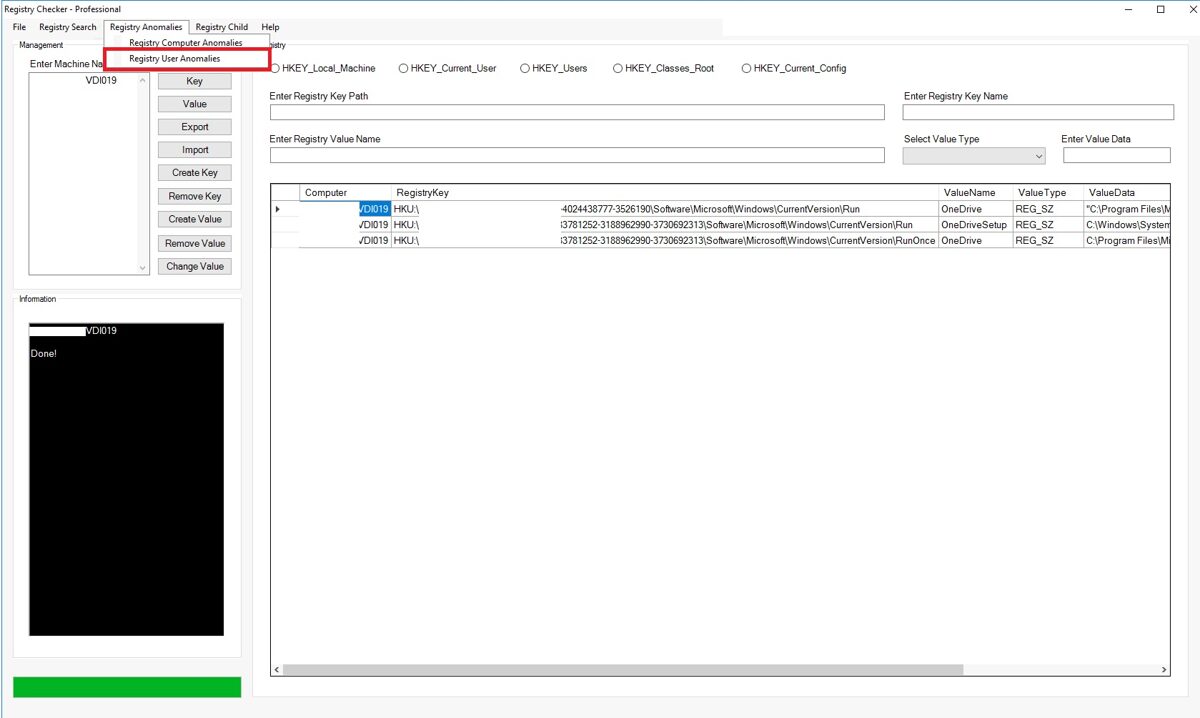
Registry User Anomalies
Below registry keys are checked by the program when you press on Computer Registry Anomalies button:
· "HKU:\$SID\Software\Microsoft\Windows\CurrentVersion\RunOnce"
· "HKU:\$SID\Software\Microsoft\Windows\CurrentVersion\Explorer\StartupApproved"
· "HKU:\$SID\Software\Microsoft\Internet Explorer\SearchScopes"
· "HKU:\$SID\Software\Microsoft\Windows\CurrentVersion\Policies"
Information can be retrieved from multiple computers at the same time.
Registry Child Data
The program also shows which registry keys are located under a specific (child) registry path. In this example we see the registry keys that are located under HKLM\Software\Microsoft\Windows\CurrentVersion\ActionCenter\Quick Actions registry path.
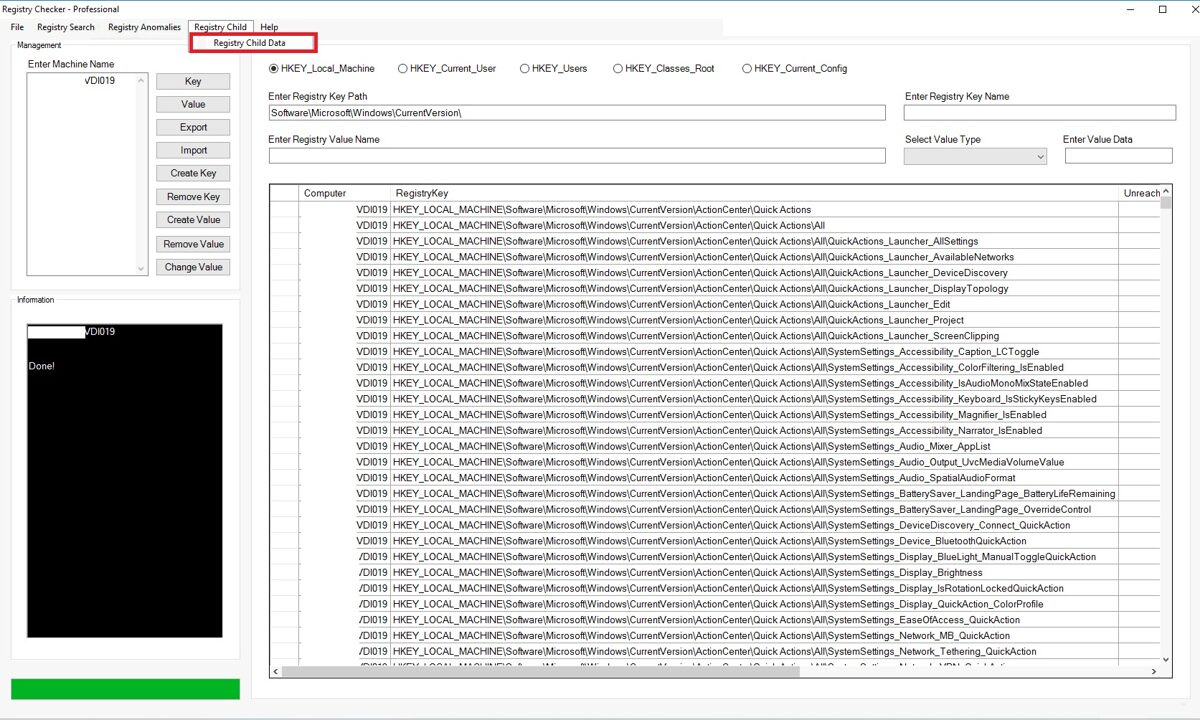
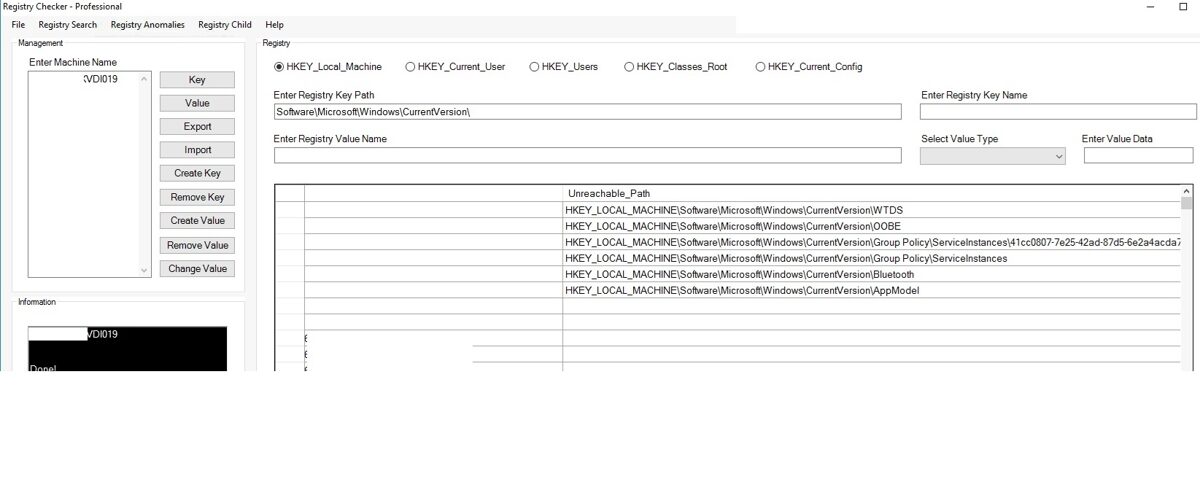
If you do not have a permission to access certain windows registry keys, you will see this information in the program.
Overall Business Value
This GUI application would provide a centralized registry management platform that improves troubleshooting, configuration management, compliance auditing, security verification, change management, and operational efficiency. By enabling administrators to quickly search, compare, modify, export, import, and analyze registry settings while identifying anomalies across users and computers, it can significantly reduce incident resolution times, improve configuration consistency, and lower administrative overhead.
This GUI application would provide a centralized registry management platform that improves troubleshooting, configuration management, compliance auditing, security verification, change management, and operational efficiency. By enabling administrators to quickly search, compare, modify, export, import, and analyze registry settings while identifying anomalies across users and computers, it can significantly reduce incident resolution times, improve configuration consistency, and lower administrative overhead.