FSLogix
FSLogix is a software solution designed to enhance and streamline the user experience in virtual desktop computing environments. It is not limited to virtual desktops and can also be used on physical desktops to provide a more portable user experience.
In this section, you'll find my PowerShell scripts written for FSLogix.
Shrink VHDX disks
In our environment, we use FsLogix and VHDX disks. VHDX disks are fixed-size and are not expandable in our environment. When a user logs into Citrix, their VHDX disk is attached to the computer, and the user can work without experiencing any lag. However, as you know, when working with a Windows computer, user profiles fill up with all sorts of temporary data, which takes up space and can fill up the entire VHDX disk.
To prevent this from happening, I wrote a PowerShell script that mounts the user's VHDX disk, deletes all unnecessary data, and shrinks the disk.
This way, the user's disk is always kept clean and does not fill up completely. In addition, we save money on data center storage space, because the more space we use, the more it costs.
1. Reduces Storage Consumption
· Frees unused space on the host storage.
· Prevents VHDX files from remaining unnecessarily large after data deletion.
2. Lowers Storage Costs
· Delays the need to purchase additional storage.
· Better utilizes existing storage infrastructure.
· Improves Storage Efficiency
3. Increases available capacity for other virtual machines.
· Helps maintain healthy storage utilization across clusters.
· Automation Eliminates Manual Work
4. Removes the need for administrators to manually compact each VHDX.
· Saves time during routine maintenance.
· Consistent Maintenance
5, Ensures every eligible VM is processed using the same procedure.
· Reduces human error and forgotten maintenance tasks.
· Scales Across Large Environments
6. Particularly valuable for environments with dozens or hundreds of VMs.
· Enables scheduled maintenance without significant administrator involvement.
· Improves Backup Efficiency
7. Smaller VHDX files may reduce backup storage requirements.
· Can shorten backup and replication windows, depending on the backup solution.
· Faster VM Migration
8. Smaller virtual disks can reduce transfer time during storage migration or VM export/import.
· May decrease live migration storage synchronization time.
· Optimizes Disaster Recovery
9. Less data to replicate to secondary sites.
· Potentially reduces recovery point synchronization times.
· Supports Capacity Planning
10. Keeps storage usage closer to actual demand.
· Makes storage growth trends more accurate.
· Reduces Administrative Overhead
11. Administrators spend less time performing repetitive maintenance.
· Frees time for higher-value operational tasks.
· Enables Scheduled Maintenance
12. Can run automatically during maintenance windows or off-peak hours.
· Minimizes impact on production workloads.
· Provides Reporting Opportunities
13. The script can generate reports showing:
· Space reclaimed
· Deleted folders
· Total savings
· Discs that were not shrunk
14. Helps organizations maintain storage management policies.
· Demonstrates proactive infrastructure maintenance.
· Extensible Automation
15. Can be integrated with:
· Windows Task Scheduler
· Email notifications
· Improves Host Storage Health
16. Helps prevent host volumes from reaching critical capacity.
· Reduces the risk of storage-related operational issues.
· Works Without Constant Administrator Supervision
17. Once configured, the process can run unattended.
· Administrators only need to review logs or alerts.
· Measurable Return on Investment (ROI)
18. Saves administrator hours.
· Increases usable storage capacity.
· May postpone infrastructure upgrades.
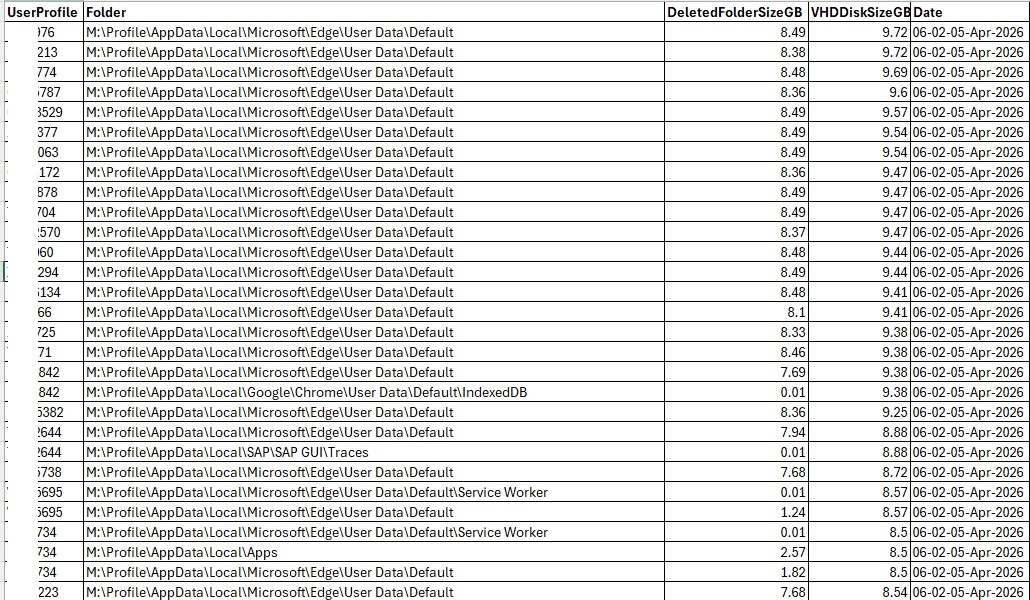
A log showing which folders the files were deleted from and how much space was freed up:
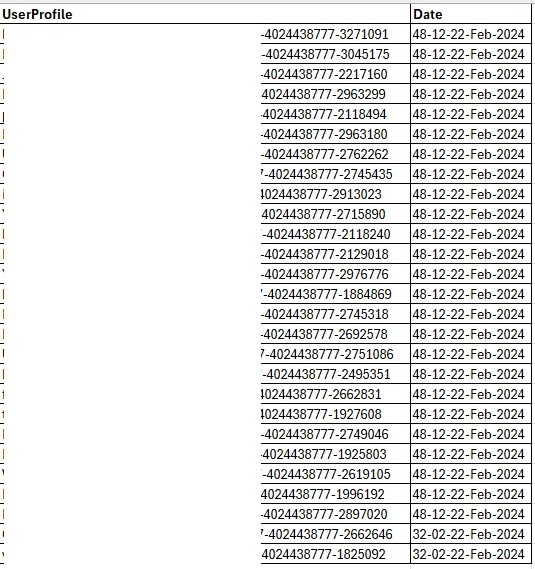
If a user was logged in at the time, the disk was not shrunk using the PowerShell script because it was already in use. However, to let you know which disks were not shrunk, we log the logged-in user's information in to another log file.
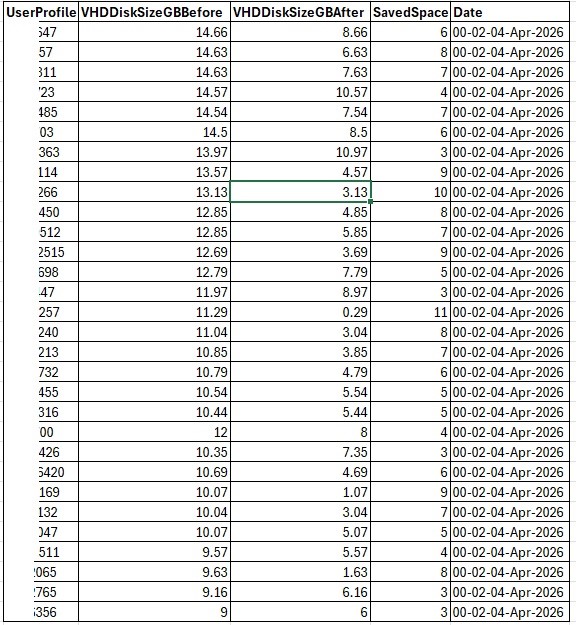
Third log file specifies the total amount of space saved:
To prevent this from happening, I wrote a PowerShell script that mounts the user's VHDX disk, deletes all unnecessary data, and shrinks the disk.
This way, the user's disk is always kept clean and does not fill up completely. In addition, we save money on data center storage space, because the more space we use, the more it costs.
Here are the main benefits:
1. Reduces Storage Consumption
· Frees unused space on the host storage.
· Prevents VHDX files from remaining unnecessarily large after data deletion.
2. Lowers Storage Costs
· Delays the need to purchase additional storage.
· Better utilizes existing storage infrastructure.
· Improves Storage Efficiency
3. Increases available capacity for other virtual machines.
· Helps maintain healthy storage utilization across clusters.
· Automation Eliminates Manual Work
4. Removes the need for administrators to manually compact each VHDX.
· Saves time during routine maintenance.
· Consistent Maintenance
5, Ensures every eligible VM is processed using the same procedure.
· Reduces human error and forgotten maintenance tasks.
· Scales Across Large Environments
6. Particularly valuable for environments with dozens or hundreds of VMs.
· Enables scheduled maintenance without significant administrator involvement.
· Improves Backup Efficiency
7. Smaller VHDX files may reduce backup storage requirements.
· Can shorten backup and replication windows, depending on the backup solution.
· Faster VM Migration
8. Smaller virtual disks can reduce transfer time during storage migration or VM export/import.
· May decrease live migration storage synchronization time.
· Optimizes Disaster Recovery
9. Less data to replicate to secondary sites.
· Potentially reduces recovery point synchronization times.
· Supports Capacity Planning
10. Keeps storage usage closer to actual demand.
· Makes storage growth trends more accurate.
· Reduces Administrative Overhead
11. Administrators spend less time performing repetitive maintenance.
· Frees time for higher-value operational tasks.
· Enables Scheduled Maintenance
12. Can run automatically during maintenance windows or off-peak hours.
· Minimizes impact on production workloads.
· Provides Reporting Opportunities
13. The script can generate reports showing:
· Space reclaimed
· Deleted folders
· Total savings
· Discs that were not shrunk
14. Helps organizations maintain storage management policies.
· Demonstrates proactive infrastructure maintenance.
· Extensible Automation
15. Can be integrated with:
· Windows Task Scheduler
· Email notifications
· Improves Host Storage Health
16. Helps prevent host volumes from reaching critical capacity.
· Reduces the risk of storage-related operational issues.
· Works Without Constant Administrator Supervision
17. Once configured, the process can run unattended.
· Administrators only need to review logs or alerts.
· Measurable Return on Investment (ROI)
18. Saves administrator hours.
· Increases usable storage capacity.
· May postpone infrastructure upgrades.
A log showing which folders the files were deleted from and how much space was freed up:
If a user was logged in at the time, the disk was not shrunk using the PowerShell script because it was already in use. However, to let you know which disks were not shrunk, we log the logged-in user's information in to another log file.
Third log file specifies the total amount of space saved: